BSA Report
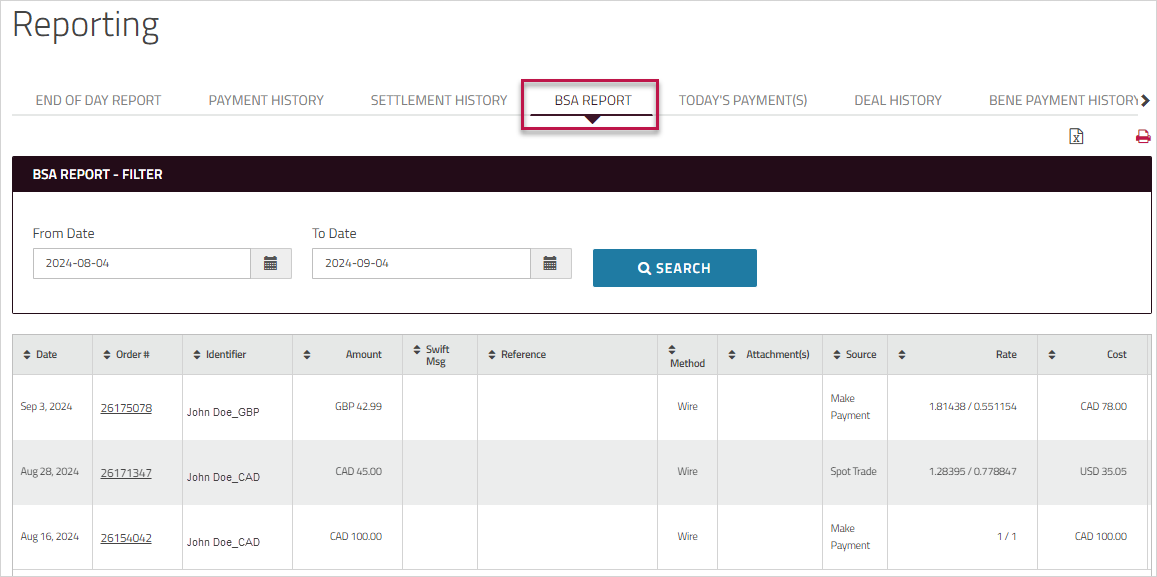
The lists all of the payments that were processed during the specified time period. By default, it lists payments processed over the past month.
Note: This is a custom report - only clients who are enabled for this report will see it.
To generate the BSA report
-
On , click, and then click .
Alternatively, in the section on the Home page, click . -
Enter the period and click .
The transactions that meet the entered criteria are displayed in the grid. - In the column, you can click a number to view the confirmation for that order.
-
On the confirmation, click the icons at the top of the page to print the confirmation, email it, or save the confirmation details as a PDF. You can use the icons beside particular line items to print or email only the information related to that item.
-
Click the name in the column to view a summary of the beneficiary's information. To close the summary view, click the beside the beneficiary's name or click anywhere on the page.
-
Click the icons at the top of the page to export the report to an Excel file or save it as a PDF.